

There are 2 instructions in this section – How to locate your AramexConnect API key, and how to integrate your AramexConnect account to ShipMarvel Pro. We will begin with locating the API key first, as you will need this to integrate your account.
How to locate your AramexConnect API key #
PLEASE NOTE: These steps may have changed, or images may look different to your account. Please contact Aramex support for further assistance if you are unable to locate your API with the below instructions.
Before starting this step, open Notepad (or another document app) on your computer. Create a file to save your AramexConnect API keys.
1. Log into your AramexConnect account. The dashboard opens.
2. On the top main menu, click Administration, then click API Keys.
3. The My API Keys page opens, click Create Key.
4. On the Add API Key page, enter a file name under Description.
5. Open Notepad on your computer and copy the Client ID and Secret number into the notepad file.
6. Click Save on the Add API Key page.
Integrating your AramexConnect account to ShipMarvel Pro #
Log into ShipMarvel Pro, click on Integrations, then look for the Couriers section. Locate the AramexConnect icon and click on the plus symbol. If there is no AramexConnect icon, click on the Add more couriers icon, and you should be able to locate the AramexConnect icon from that list.
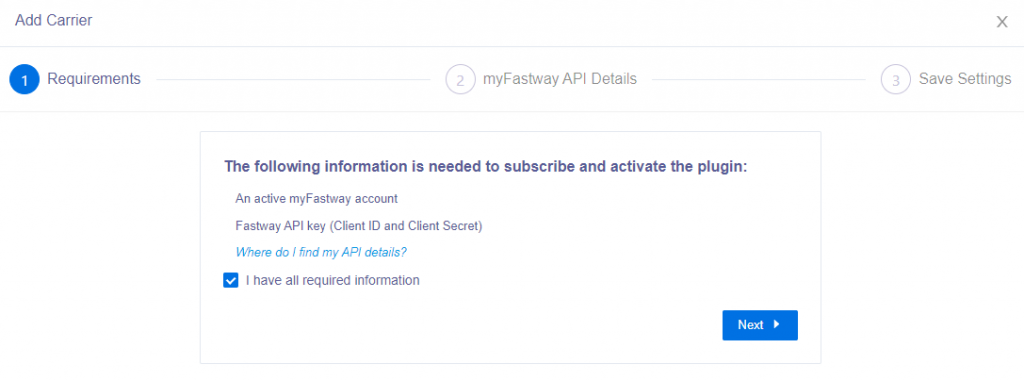
Check the box “I have all required information” then click Next button
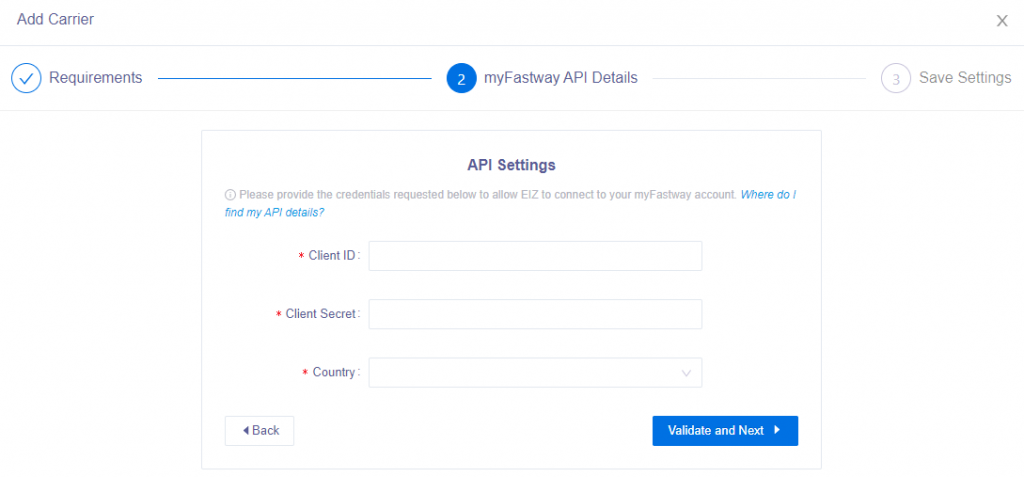
Enter in your API keys (Client ID and Client Secret) and select your country, then click Validate and Next
A pop-up window will appear to advise your integration has been successful, click the Save button.


