logo
  • Back to EIZ
  • Support Docs

What is EIZ?

Shipmarvel User Guide

54
  • ShipMarvel (legacy version)
    • Self-Onboarding
      • Quick guide to processing your orders
      • Self-Onboarding with Shipmarvel
    • Integrations
      • Channels
        • How to integrate Tradevine (Trademe)
        • How to integrate PrestaShop
        • How to integrate Neto (Maropost)
        • How to integrate Catch
        • How to integrate BigCommerce
        • How to integrate Amazon
        • How to integrate eBay
        • How to integrate Shopify
        • How to integrate WooCommerce
        • How to integrate Kogan
        • How to integrate CIN7
        • How to integrate Unleashed
        • How to integrate CIN7 Core (Dear)
        • How to integrate Groupon
        • How to integrate Magento 2
        • How to integrate Bunnings
        • How to integrate MyDeal
        • How to integrate Shopline
      • Couriers
        • How to integrate MyPost Business
        • How to integrate CouriersPlease
        • How to integrate eParcel
        • How to integrate Aramex myFastway
        • How to integrate Sendle
    • Insights
      • Insights of your online business
    • New Orders
      • How to create an order
      • How to manage your new orders
      • How to change shipping carrier
    • Ready to Ship
      • How to print shipping labels
      • Book in your courier for pickup
    • Tracking
      • Tracking your shipments
    • Listing
      • How to manage your Listings
    • Carrier
      • Quick Quote
      • Searching for Consignments
  • ShipMarvel Pro
    • Dashboard
    • Send Parcels
    • What are Label Credits?
    • Top Up Balance for Shipping Costs
    • Action Required
    • Products
    • Manual Order
    • New Orders
    • Awaiting Dispatch
    • Billing
    • Completed
    • Connections
      • Channels
        • How to integrate Shopify
        • How to Integrate eBay
        • How to Integrate Amazon
        • How to Integrate WooCommerce
      • Couriers
        • How to Integrate MyPost Business
        • How to Integrate eParcel
        • How to Integrate AramexConnect
        • How to Integrate CouriersPlease

Lofko User Guide

43
  • EIZ Fulfillment Orders
    • How to change the order of Tabs
    • How to delete a Tab
    • How to add a new Tab
    • How to filter by all express orders
    • How to combine same address orders
    • How to use the Tabs function
    • How to use the Orders function
  • EIZ Fulfillment Shipments
    • How to sort the picking slip by the items
    • How to cancel a shipment
    • How to print an address label for a letter
    • How to create Shipments from orders
  • EIZ Fulfillment Settings
    • How to add multiple sender addresses
    • How to add new package information
    • How to add the SKU or SRN on a shipping label
    • How to view and download tax invoices
    • EIZ Fulfillment Sales Channel Setting
      • How to connect Woocommerce
      • How to connect Shopify
      • How to connect Tradevine (Trademe)
      • How to connect Prestashop
      • How to connect Neto (Maropost)
      • How to connect Magento
      • How to connect Kogan
      • How to connect Groupon
      • How to connect Cin7 Core (Dear)
      • How to connect Amazon
      • How to connect Cin7
      • How to connect Catch
    • EIZ Fulfillment Carrier Setting
      • How to setup MyPost Business on EIZ Fulfillment
      • How to setup Hunter Express on EIZ Fulfillment
      • How to setup Toll on EIZ Fulfillment
      • How to setup TNT on EIZ Fulfillment
      • How to setup Startrack on EIZ Fulfillment
      • How to setup Sendle on EIZ Fulfillment
      • How to setup DHL
      • How to setup Couriers Please
      • How to setup Border Express
      • How to setup Aramex International
      • How to setup Australia Post letter
      • How to setup Australia Post eParcel
      • How to setup Allied Express
      • How to setup MyFastway on EIZ Fulfillment
  • EIZ Fulfillment Dashboard
    • How to use Dashboard function
  • Video Guide
    • Video Guide

Troubleshooting FAQs

5
  • Why is my shipping calculation incorrect or not displaying any prices at checkout?
  • Why are my WooCommerce orders not syncing?
  • I can’t see any shipping quotes in EIZ?
  • Printer-Agent Software Installation Guide for Mac users
  • eBay orders stopped syncing to my EIZ account

Woocommerce EIZ App Setting

1
  • How to integrate WooCommerce
View Categories
  • Home
  • Docs
  • Shipmarvel User Guide
  • ShipMarvel Pro
  • Connections
  • Couriers
  • How to Integrate MyPost Business

How to Integrate MyPost Business

2 min read

0:00 / 1:45
  • View as Markdown Open this page as plain Markdown (opens in a new tab)
  • Open in ChatGPT Ask questions about this page (opens in a new tab)
  • Open in Claude Ask questions about this page (opens in a new tab)
  • Open in Google AI Studio Ask questions about this page (Google account required) (opens in a new tab)

Make sure you have a MyPost Business account #

If you currently do not have a MyPost Business account, create one by visiting the Australia Post website here: https://auspost.com.au/mypost-business.

Retrieve your Merchant Token #

You will need to copy your Merchant Token for your MyPost Business account. This will be used to connect your MyPost Business account to EIZ.

To find your Merchant Token, login to your current MyPost Business account at: https://auspost.com.au/mypost-business.

You will require your MyPost Business Email Address and MyPost Business Password.

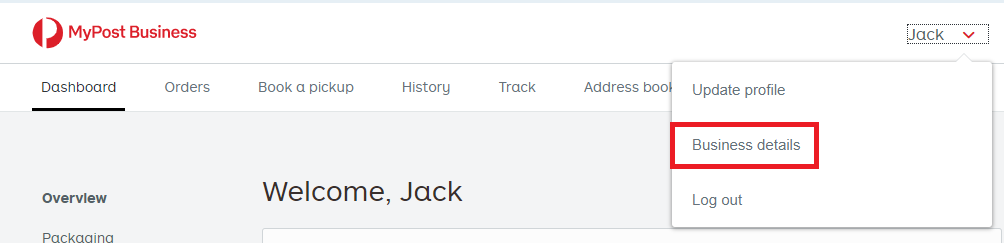
Once logged in, click the drop-down in the top-right corner of your account name and select Business details.
Click Platform Partners on the left side menu, then locate ‘EIZ’ and click ‘Connect’

Check the tick box to accept Terms & Conditions, then click Continue

If you have previously accepted these Terms & Conditions, you won’t be asked to accept again.

Once your account has been set up, you should see the below image. Enter in your credit card details and then click Add Card

If you’ve already added a payment card, you won’t be asked to add another one.

Go back to Platform Partners if you’re not in that section and click on Copy Token to copy your Merchant Token and paste into notepad for later use in this integration.

How to integrate your MyPost Business account #

Go to Connections > Couriers

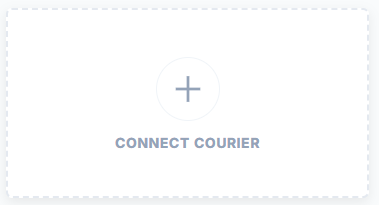
If you can’t see the MyPost Business icon, click on Connect Courier:
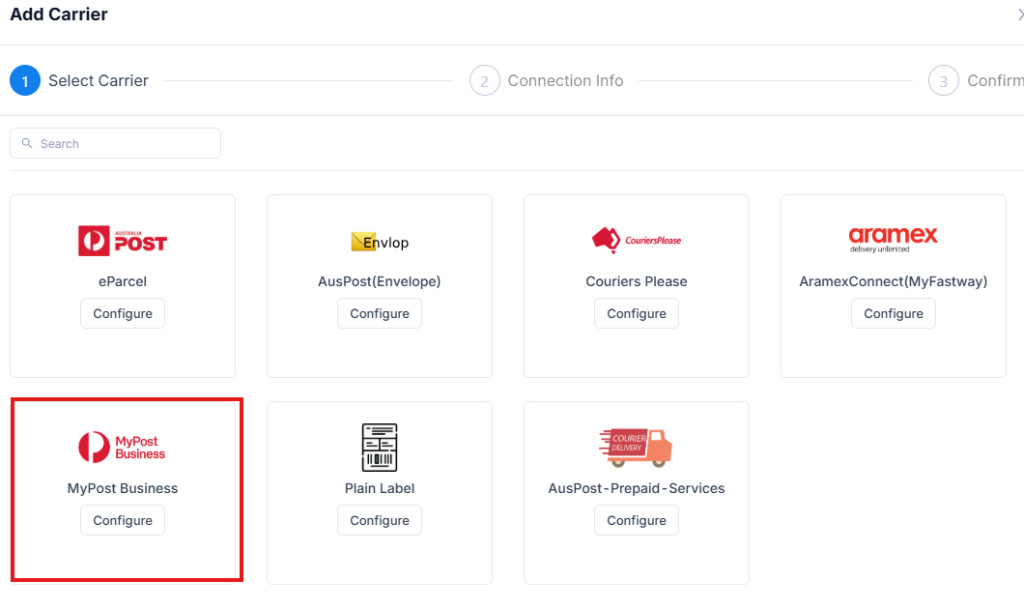
A side window will pop out from the right of your screen, click on Configure once you locate the icon.
Another window will pop out from the right for you to paste in your Merchant Token that you copied earlier, then click on the Save Settings button.

Now your MyPost Business and Shipmarvel Pro integration is complete.

Updated on April 29, 2026

What are your Feelings

  • Happy
  • Normal
  • Sad

Share This Article :

  • Facebook
  • X
  • LinkedIn
  • Pinterest
How to Integrate CouriersPleaseHow to Integrate eParcel

Powered by BetterDocs

Table of Contents
  • Make sure you have a MyPost Business account
  • Retrieve your Merchant Token
  • How to integrate your MyPost Business account

Stay up to date with EIZ